0%

docker 安装 yapi(1.9.2)

安装前提

  • node 12.18.2(14 会报异常)
  • mongo

docker 安装 mongo

1
2
3
4
5
6
7
8
docker pull mongo

docker run -itd --name mongo -p 27017:27017 mongo --auth

docker exec -it mongo mongo admin

db.createUser({ user:'admin',pwd:'fmzh1988',roles:[ { role:'userAdminAnyDatabase', db: 'admin'},"readWriteAnyDatabase"]});
db.auth('admin', 'fmzh1988')

node 高低版本切换

liunx 下 node 降级
linux 安装 nvm

1
2
3
4
5
6
7
8
9
10
11
12
13
14
15
16
17
18
19
20
21
22
23
24
25
26
curl -o- https://raw.githubusercontent.com/creationix/nvm/v0.31.1/install.sh | bash
or
wget -qO- https://raw.githubusercontent.com/creationix/nvm/v0.31.1/install.sh | bash

source ~/.bashrc

nvm install v12.18.2 # 下载node https://nodejs.org/download/release/v12.18.2/
nvm alias default 12.18.2 #将 12.18.2版本设为默认版本

NVM 的基本使用
查看本地所有可以用的 Node.js 版本:

$ nvm list
查看服务器端可用的 Node.js 版本:

$ nvm ls-remote
推荐使用 8.* LTS 版本 (长久维护版本) ,使用以下命令安装:

$ nvm install 8.11.2
设置默认版本:

$ nvm use 8.11.2
$ nvm alias default 8.11.2
检查 Node.js 的版本:

$ node -v

yapi 安装

1
2
3
4
5
6
7
8
9
10
11
12
13
14
npm install -g yapi-cli --registry https://registry.npm.taobao.org
yapi server

在localhost:9090中打开进行配置数据库信息
公司名:foxhello
数据库:admin
用户名:admin
密码:fm**1**8
邮箱:fm****@sina.***

进入服务器my-yapi目录中
node vendors/server/app.js

进入localhost:3000中打开页面,通过邮箱和日志中提示的密码登录

yapi 官网

docker 安装 oracle12c

基本操作

  1. docker pull absolutapps/oracle-12c-ee
    查看 docker 日志:docker logs oracle_12c
    _复制文件:docker cp xjrwms20210119.dmp oracle_12c:/root/data/xjrwms20210119.dmp_
  2. 用户名密码:system/oracle@orcl 1521
  3. 基本命令
1
2
3
4
5
6
7
8
9
10
11
12
13
14
15
16
17
18
sqlplus /nolog

conn /as sysdba
select * from v$session;

--创建命名空间
create tablespace test_tablespace datafile '/DATA1/oradata/db/test1.dbf' size 1024M;
--创建用户
create user testuser identified by password123 default tablespace test_tablespace;

create user test identified by test;
grant connect,resource,dba to test;

imp test/test@orcl file=/root/data/xjrwms20210119.dmp ignore=y full=y

dba_tablespaces
dba_data_files

问题

  1. ORA-12547: TNS:lost contact
    原因权限不够
    确认$ORACLE_HOME/bin/oracle 文件权限是否有问题
1
2
3
4
5
6
7
8
9
10
最初的权限
[root@dbserver /]# ll $ORACLE_HOME/bin/oracle
-rwxr-x--x. 1 oracle dba 407988851 Aug 1 12:50 /usr/oracle/product/bin/oracle

修改后正确的权限
[root@dbserver /]# chmod 6751 $ORACLE_HOME/bin/oracle
[root@dbserver /]# ll $ORACLE_HOME/bin/oracle
-rwsr-s--x. 1 oracle dba 407988851 Aug 1 12:50 /usr/oracle/product/bin/oracle

lsnrctl start

2、IMP-00002: failed to open xjrws20210119.dmp for read
命令后添加 full=y

imp user/pwd@tns file=d:/****.dmp full=y

参考资料

docker 安装 oracle 12c
oracle 查看表空间及大小
ORA-12547: TNS:lost contact+oracle 开启监听失败

注意点

  1. spring-mvc 引入 jackson-dataformat-xml 依赖后接口返回 xml
1
2
3
4
<dependency>
<groupId>com.fasterxml.jackson.dataformat</groupId>
<artifactId>jackson-dataformat-xml</artifactId>
</dependency>

webservice

cxf 实现 webservice

问题

  1. 如何提供服务、客户端如何调用?
    见参考资料

  2. wsdl 怎么看?

  3. postman 怎么调用?

1
2
3
4
5
6
7
8
9
10
11
12
13
14
15
16
http://localhost:8023/api/services/ws/fmzh?wsdl
方法:post
header:Content-Type=text/xml
参数:body - raw - xml
<soap:Envelope xmlns:soap="http://schemas.xmlsoap.org/soap/envelope/" xmlns:pm="http://server.webservice.iot.dataplatform.nti56.com">
  <soap:Body>
    <pm:fmzhMethod2>
<arg0 test="123">
<id>fmzh</id>
<eleClassA>fmzhName</eleClassA>
<birthday>2021-01-28T09:19:28.810+08:00</birthday>
<remark>你好</remark>
</arg0>
    </pm:fmzhMethod2>
  </soap:Body>
</soap:Envelope>
  1. 入参出参如何设置对象类型?
    定义 dto 对象即可
  2. xml 复杂标签如何设置
1
2
3
4
5
6
7
8
9
10
11
12
13
14
15
16
17
18
19
20
21
package com.nti56.dataplatform.iot.webservice.dto;

import lombok.Getter;
import lombok.Setter;

import javax.xml.bind.annotation.*;
import java.util.Date;

@Getter
@Setter
@XmlRootElement(name = "fields")
@XmlAccessorType(XmlAccessType.FIELD)
public class Request {
private String id;
@XmlElement(name="eleClassA")
private String name;
@XmlAttribute(name = "test")
private Integer age;
private Date birthday;
private String remark;
}

示例代码

springboot.example.apiversion

参考资料

基础入门
使用 postman 测试 webservice 接口 1
使用 postman 测试 webservice 接口 2


Ineffective mark-compacts near heap limit Allocation failed - JavaScript heap out of memory

export NODE_OPTIONS=–max_old_space_size=4096

stackoverflow

git error: RPC failed; result=35, HTTP code = 0 fatal: The remote end hung up unexpectedly

git config –global http.postBuffer 20M

文件比对

codemirror && diff-match-patch

官网示例
demo
diff-match-patch issue

vue 整合

1
2
3
4
5
6
7
8
9
10
11
12
13
14
15
16
17
18
19
20
21
22
23
24
25
26
27
28
29
30
31
32
33
34
35
36
37
38
39
40
41
42
43
44
45
46
47
npm install codemirror
npm install diff-match-patch

<template>
<div id="view"></div>
</template>
<script>
import CodeMirror from 'codemirror'
import 'codemirror/lib/codemirror.css'
import 'codemirror/addon/merge/merge.js'
import 'codemirror/addon/merge/merge.css'
import DiffMatchPatch from 'diff-match-patch'
window.diff_match_patch = DiffMatchPatch
window.DIFF_DELETE = -1
window.DIFF_INSERT = 1
window.DIFF_EQUAL = 0
export default {
name: 'Diff',
mounted () {
let value = 'abcc'
let orig2 = 'abcd'
this.initUI(value, orig2)
},
methods: {
initUI (value, orig2) {
if (value == null) {
return
}
let target = document.getElementById('view')
target.innerHTML = ''
CodeMirror.MergeView(target, {
value: value, // 上次内容
origLeft: null,
orig: orig2, // 本次内容
lineNumbers: true, // 显示行号
mode: 'text/html',
highlightDifferences: true,
connect: 'align',
revertButtons: true, // 是否显示还原按钮
readOnly: true// 只读 不可修改
})
}
}
}
</script>
<style scoped>
</style>
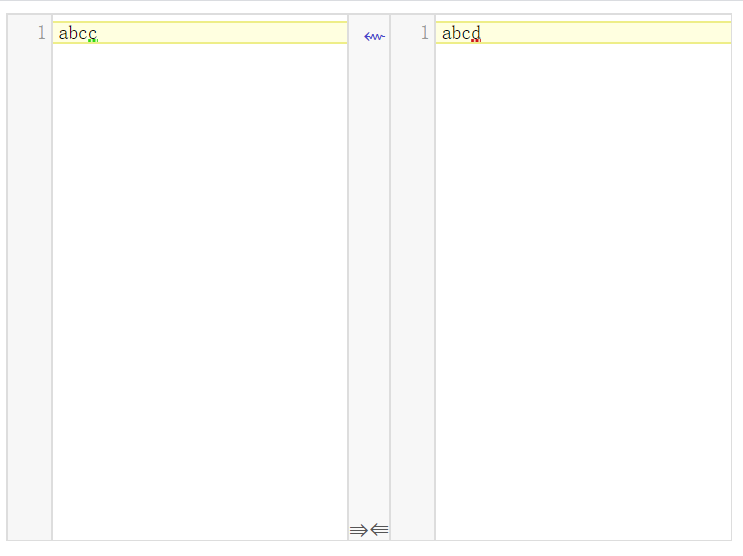
  • 效果

大数据

hive 基本命令如下:

1
2
3
4
5
6
7
8
9
10
#进入hive人机交互界面
hive

#操作类mysql
show databases;
show tables;
show partitions sync_job_log;

#添加分区
alter table sync_job_log add partition(dt=20210111);

hdfs 基本命令如下:

1
2
3
4
5
#切换hdfs用户
su hdfs

#查询创建目录
hdfs dfs -ls /user/hive/warehouse/nti_dev_proj.db

cdh6.2.0 操作步骤:

1
2
3
4
5
6
http://10.1.20.246:7180/cmf/home
admin 123456

选择hdfs
选择Web UI -> apache3
选择Utilities -> Browse the file system

源码学习 (分析方法:5w2h)

  • what 数据同步工具
  • how 通过 python 执行,根据 json 配置信息,从源数据库同步到目的数据库
  • why 离线同步数据

问题

  1. 如何解析 json?
    使用 fastJson 解析 JSON.parse(json)生成 Object 对象(本质为 map 对象)
  2. 如何加载各个插件?
    使用 ClassLoader 加载 jar 包,通过配置文件 plugin.json 的 class 属性生成 Job 或者 Task 对象
  3. 具体配置是如何处理的?
    通过 Configuration 对象封装 json 转换的对象,通过 key 打平进行获取及存储, 见附录一

datax 相关命令

控制台测试命令

python D:/fmzh/datax/datax/datax/bin3.0/datax.py -p"-Dhadoop.home.dir=D:\thirdlib\hadoop-common-2.2.0-bin" jobTmp-d80defde826447bbb5f6d50e607633c2.conf > log.logging

附录

一 datax 中 json 扩展

1
2
3
4
5
6
7
8
9
10
11
12
13
14
15
16
17
18
19
20
21
22
23
24
25
26
27
28
29
30
31
32
33
34
35
36
37
38
39
40
41
42
43
44
45
46
47
48
49
50
51
52
53
54
55
56
57
58
59
60
61
62
63
64
65
66
67
68
69
70
71
72
73
74
75
76
77
78
79
80
81
82
83
84
85
86
87
88
89
90
91
92
93
94
95
96
97
98
99
100
101
102
103
/**
* 根据用户提供的json path,寻址具体的对象。
* <p/>
* <br>
* <p/>
* NOTE: 目前仅支持Map以及List下标寻址, 例如:
* <p/>
* <br />
* <p/>
* 对于如下JSON
* <p/>
* {"a": {"b": {"c": [0,1,2,3]}}}
* <p/>
* config.get("") 返回整个Map <br>
* config.get("a") 返回a下属整个Map <br>
* config.get("a.b.c") 返回c对应的数组List <br>
* config.get("a.b.c[0]") 返回数字0
*
* @return Java表示的JSON对象,如果path不存在或者对象不存在,均返回null。
*/
public Object get(final String path) {
this.checkPath(path);
try {
return this.findObject(path);
} catch (Exception e) {
return null;
}
}

private String split(final String path) {
return StringUtils.replace(path, "[", ".[");
}

private List<String> split2List(final String path) {
return Arrays.asList(StringUtils.split(split(path), "."));
}

private boolean isPathList(final String path) {
return path.contains("[") && path.contains("]");
}

private boolean isPathMap(final String path) {
return StringUtils.isNotBlank(path) && !isPathList(path);
}

private Object findObject(final String path) {
boolean isRootQuery = StringUtils.isBlank(path);
if (isRootQuery) {
return this.root;
}

Object target = this.root;

for (final String each : split2List(path)) {
if (isPathMap(each)) {
target = findObjectInMap(target, each);
continue;
} else {
target = findObjectInList(target, each);
continue;
}
}

return target;
}

@SuppressWarnings("unchecked")
private Object findObjectInMap(final Object target, final String index) {
boolean isMap = (target instanceof Map);
if (!isMap) {
throw new IllegalArgumentException(String.format(
"您提供的配置文件有误. 路径[%s]需要配置Json格式的Map对象,但该节点发现实际类型是[%s]. 请检查您的配置并作出修改.",
index, target.getClass().toString()));
}

Object result = ((Map<String, Object>) target).get(index);
if (null == result) {
throw new IllegalArgumentException(String.format(
"您提供的配置文件有误. 路径[%s]值为null,datax无法识别该配置. 请检查您的配置并作出修改.", index));
}

return result;
}

@SuppressWarnings({ "unchecked" })
private Object findObjectInList(final Object target, final String each) {
boolean isList = (target instanceof List);
if (!isList) {
throw new IllegalArgumentException(String.format(
"您提供的配置文件有误. 路径[%s]需要配置Json格式的Map对象,但该节点发现实际类型是[%s]. 请检查您的配置并作出修改.",
each, target.getClass().toString()));
}

String index = each.replace("[", "").replace("]", "");
if (!StringUtils.isNumeric(index)) {
throw new IllegalArgumentException(
String.format(
"系统编程错误,列表下标必须为数字类型,但该节点发现实际类型是[%s] ,该异常代表系统编程错误, 请联系DataX开发团队 !",
index));
}

return ((List<Object>) target).get(Integer.valueOf(index));
}